
When I started building A11Y Cat
When I started working on A11Y Cat, the idea was simple. I wanted a browser extension that could help me inspect accessibility issues quickly, directly on a page, and give me structured findings I could actually use. Not vague warnings. Not pretty dashboards with questionable numbers. Not a tool that says scan complete while quietly mixing real failures, manual checks, advisory notes, and false positives into one confusing pile. I wanted something that could help me work faster, but still respect the reality of accessibility testing. Accessibility is not just about running a tool. It is about understanding what the tool can prove, what it cannot prove, and where human judgement is still required. That became one of the biggest lessons of this project.
The scanner is the heart of the extension
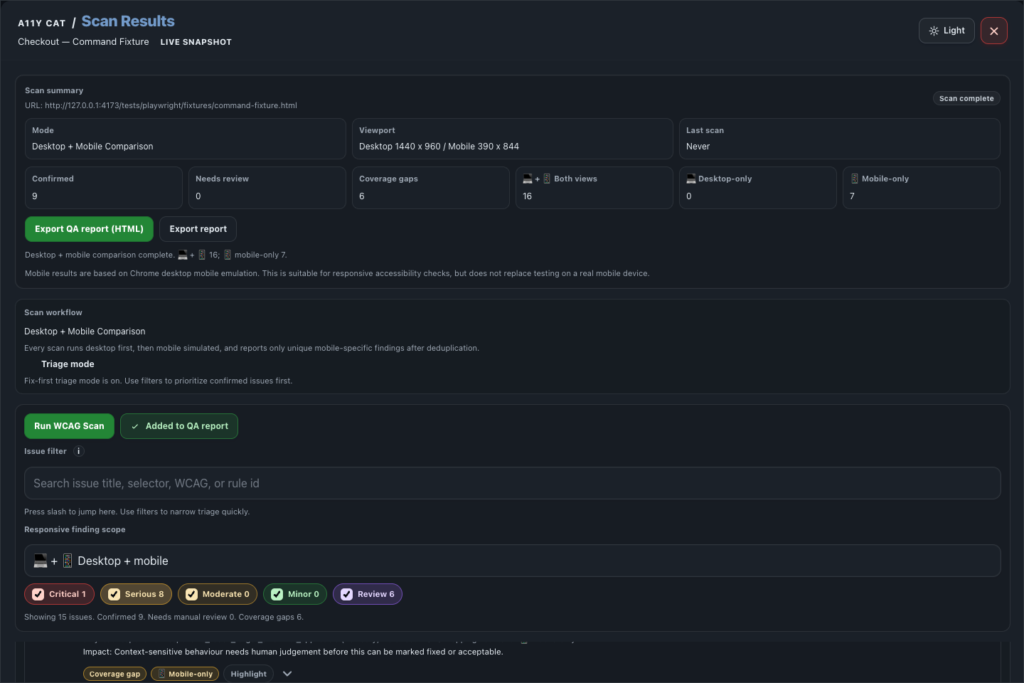
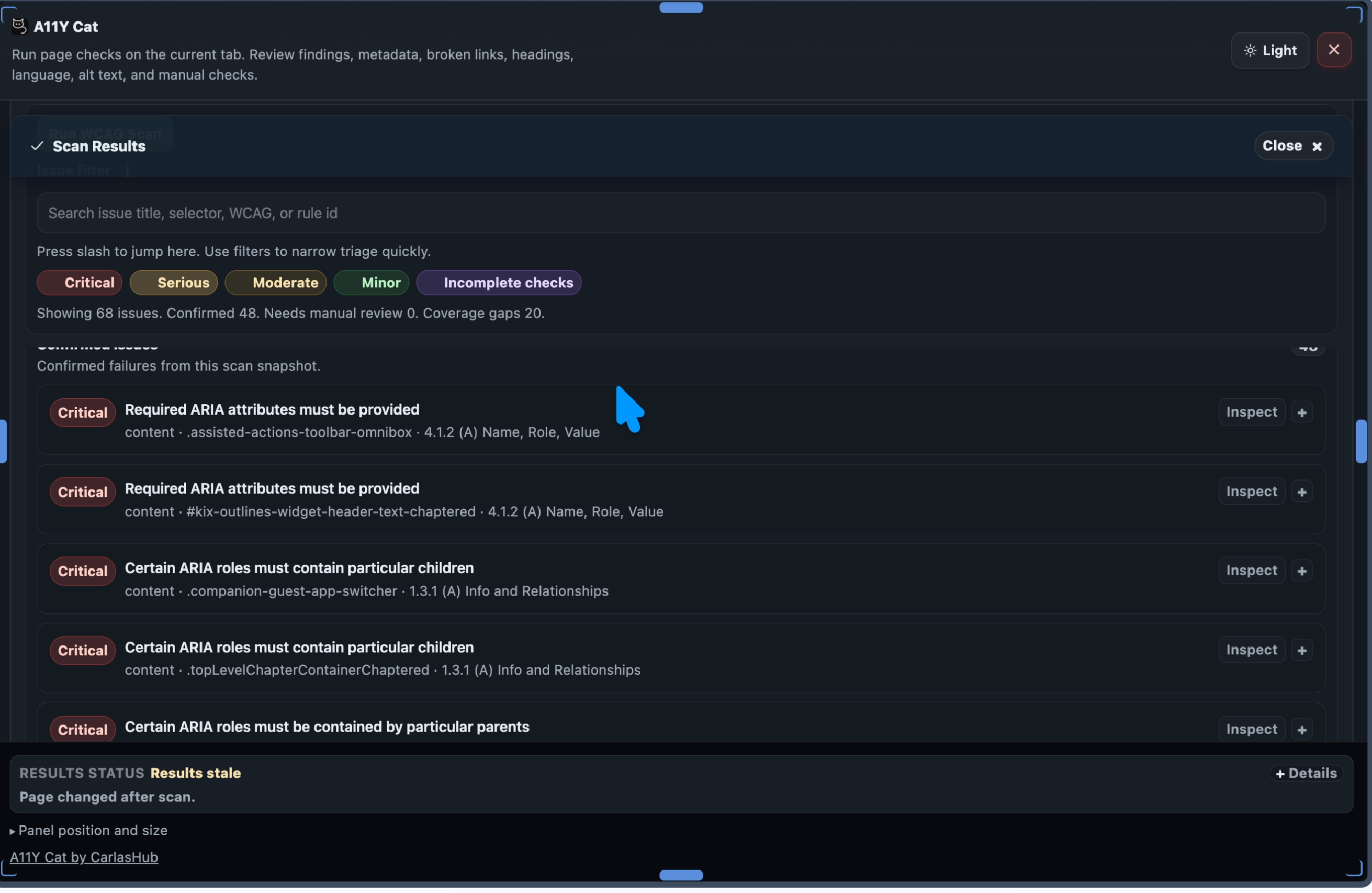
A11Y Cat is not useful because it has buttons, panels, filters, exports, or nice visual sections. Those things matter, but they are not the heart of the product. The heart of the product is the scanner. If the scanner is wrong, everything else becomes decoration. If axe core is not executed properly, the report cannot be trusted. If raw axe results are not preserved, the evidence chain is broken. If incomplete results are shown as confirmed failures, the tool becomes misleading. If custom logic creates false positives, the tool creates noise instead of clarity. So the biggest question became: is the scanner actually working, or does it only look like it is working?
Passing tests was not enough
One of the most uncomfortable parts of this work was realising that automated tests can pass and still not prove the right thing. A test can prove that a button exists. That does not prove the feature is useful. A test can prove that a spelling button fires. That does not prove it performs real spelling checks. A test can prove that a build folder is complete. That does not prove the Chrome Web Store ZIP is complete. This is where I had to stop trusting broad statements like all tests pass. That is not enough. The better question is: what exactly do these tests prove? That became one of the main lessons from working with agents. You cannot just ask an AI agent to fix it and then accept the answer. You have to interrogate the work. You have to ask what was tested, what was not tested, what path was used, whether the final package was inspected, and whether the evidence matches the user experience.
Why axe core needed a full diagnosis
Axe core is one of the most important engines in accessibility testing. It can detect many deterministic accessibility problems in the rendered page, but it is not magic, and it can still be misused. The problem is not usually axe core itself. The problem is often how a product wraps axe core. A scanner can go wrong by loading axe incorrectly, running axe in the wrong context, scanning its own extension UI, scanning injected third party overlays, dropping raw axe metadata, changing severity without explaining why, mixing incomplete results with confirmed failures, or adding custom findings that look like axe findings. So I asked the agent to stop implementing and first diagnose the scanner properly. No UI changes. No patches. No quick fixes. First understand the pipeline. The goal was to understand whether every issue could be traced from raw axe output to normalised issue to visible UI to export. If that chain breaks, the scanner is not ready.
Preserving the original axe finding
One of the most important requirements was that every axe derived issue must preserve the original axe data. That means keeping details like the axe rule ID, impact, help text, help URL, description, tags, target selector, HTML snippet, failure summary, WCAG mapping, and source engine. This matters because developers need to understand exactly where the issue came from. If the extension takes an axe finding and turns it into a generic internal issue without keeping the original source, the report becomes weaker. A developer cannot easily check the axe rule, compare the evidence, or understand whether the issue is from axe core or from custom logic. A good scanner should not hide the source of truth.
Confirmed issues must stay clean
A scanner should not throw everything into one bucket. There is a big difference between confirmed axe violations, axe incomplete results, custom deterministic failures, manual review items, visual composition review, language or spelling advisory notes, scan limitations, and diagnostics. For A11Y Cat, the scanner needs a clear model. Confirmed Issues should include real axe violations and other deterministic findings that can be confidently reported. Manual or Review Items should include things that need human judgement, including axe incomplete results, visual checks, state limited checks, and issues where automation cannot be certain. Advisory Notes should include helpful but non blocking guidance, such as spelling review, metadata recommendations, or language regional subtag advice. This matters because accessibility testing already has enough confusion. A tool should reduce confusion, not add more.
False positives can destroy trust
A tool that reports too many false positives becomes unusable. Developers stop trusting it. QA stops trusting it. Accessibility reviewers waste time explaining why the report is wrong. False positives can come from custom rules that are too aggressive, scanning hidden content, scanning extension UI, scanning BugHerd or injected overlays, misunderstanding accessible names, treating advisory guidance as failure, treating valid ARIA as invalid, or treating lang equals en as a failure when it may be valid. This is why I asked the agent to audit valid markup cases, not only broken markup. A good scanner must prove that it does not flag valid patterns as failures.
False negatives are just as dangerous
False positives are noisy, but false negatives are dangerous. A false negative means the tool misses a real issue. This can happen if dedupe removes real distinct findings, exclusion filters hide authored content, severity filters hide items silently, restricted pages look like clean scans, timeouts are reported as successful scans, unsupported languages are treated as passed, iframes fail silently, broken link failures are ignored, or metadata parsing errors disappear. If the scanner cannot inspect something, it should say so clearly. It should not pretend the page is clean.
Agents need follow up, pressure, and evidence
This project also taught me something important about working with AI agents. Agents can be useful. They can inspect files quickly, write tests, generate reports, and connect pieces of a project that would take a long time to review manually. But they also need supervision. An agent can say fixed too early. An agent can optimise for passing tests instead of improving the product. An agent can miss the difference between dev build and final package. An agent can leave old architecture references in the project. An agent can rely on a test that proves only wiring, not behaviour. This is why the back and forth is not wasted time. It is the work. You have to challenge the agent. You have to ask for evidence. You have to ask what was tested. You have to ask whether the final package was inspected. You have to ask whether the user facing behaviour matches the claim. The agent is not a replacement for engineering judgement. It is a tool that needs direction.
The prompt that changed the work
The turning point was asking for a diagnosis only scanner audit. No changes. No patches. No UI updates. Just inspect the complete pipeline and report what is proven, what is weak, what is risky, and what is not known. The following prompts are the full diagnostic structure I used to force a proper scanner audit.
The scanner standard I wanted
| Requirement | Why it matters |
|---|---|
| Raw axe results preserved | A developer must be able to trace every finding back to the original axe rule and node. |
| Incomplete results separated | Uncertain results must not be shown as confirmed failures. |
| Custom logic labelled clearly | Product owned findings must not pretend to be axe findings. |
| Valid markup protected | The scanner must not create noise by flagging correct patterns. |
| Exclusions safe | Injected overlays should be ignored without hiding authored page content. |
| Exports traceable | CSV and JSON must carry enough evidence to support debugging and review. |
Appendix: Scanner diagnosis prompts
These prompts were written as an audit contract for the agent. The point was not to change the UI. The point was to diagnose the scanner pipeline completely before allowing implementation work.
Prompt 1: Diagnosis only instruction
You are performing a diagnosis-only audit of the A11Y Cat scanner. Do not edit files. Do not refactor. Do not patch. Do not update tests. Do not change UI. Do not change documentation. Do not change package scripts. Do not make release claims. Your task is to inspect the scanner implementation in full and report whether it is running correctly, accurately, and safely enough to trust. This is the most important part of the extension. If the scanner is wrong, the whole product is untrustworthy.
The audit must answer one central question:
Is A11Y Cat using axe core and its own scanner logic correctly, preserving the original findings, filtering them properly, avoiding false positives, separating confirmed issues from manual review and advisory items, and presenting and exporting the results accurately? Return findings only. No implementation changes in this task.
Prompt 2: Audit scope
Inspect the full scanner path from user action to rendered or exported result.
Inspect all relevant files, including but not limited to:
manifest.json extension/background/service-worker.js extension/background/webext-api.js extension/content/content-entry.js extension/content/extension-entry.js if present dist-extension generated files if relevant src/runtime/modules/scan-engine.js src/runtime/modules/scan-orchestrator.js src/runtime/modules/stateful-scan-runner.js src/runtime/modules/trust-model.js src/runtime/modules/source-attribution.js src/runtime/modules/exports.js src/runtime/modules/panel-render.js src/runtime/modules/ui-rendering.js src/runtime/modules/history-storage.js src/runtime/modules/language-analysis.js src/runtime/modules/spelling-engine.js src/runtime/modules/metadata-analysis.js src/runtime/modules/link-checking.js src/runtime/modules/alt-text-analysis.js src/runtime/modules/section-order.js src/runtime/modules/capabilities-registry.js scripts/build-extension.js scripts/check-extension.js scripts/package-artifacts.js tests/playwright tests/node vendor/axe.min.js generated bundled runtime files inside the final Chrome Web Store package
Also inspect the final store package if available:
release/artifacts/store-submission/*.zip Extract the final ZIP and inspect the actual packaged scanner code, not only source files. If source and packaged output differ, packaged output is the truth for release readiness.
Prompt 3: User action to scanner execution path
Map the exact path from user clicking the extension to scan execution.
Answer:
- What user action starts the main scan? 2. Which UI control triggers it? 3. Which event handler receives it? 4. Which runtime message is sent? 5. Which service worker or background handler receives it? 6. Which content script is injected? 7. Which scripts are injected, in what order? 8. Where is axe core loaded from? 9. Is axe loaded before the scanner runs? 10. Is axe loaded locally from the extension package? 11. Is axe ever loaded from a CDN or network? 12. Where is axe.run called? 13. What scan context is passed to axe.run? 14. What axe options or configuration are passed? 15. What happens if injection fails? 16. What happens if axe is unavailable? 17. What happens if the page is restricted? 18. What happens if the tab closes mid scan? 19. What happens if the service worker restarts? 20. What happens if the page mutates during scan?
Required output:
Provide a step by step call chain with file names, function names, and line references where possible.
Verdict required:
Scanner execution path clear: YES or NO
Axe execution path clear: YES or NO
Release package execution path verified: YES or NO
Prompt 4: Axe core integration audit
Audit axe core usage in detail.
Answer:
- Which axe core version is bundled? 2. Where is the bundled axe file located? 3. How is it included in the Chrome Store package? 4. Is it the same axe version used in tests and release? 5. Is axe core executed in the rendered page context? 6. Is axe core executed after the page is sufficiently loaded? 7. Does axe core get access to computed styles and rendered DOM? 8. Does axe core scan the actual page content? 9. Does axe core accidentally scan the A11Y Cat UI? 10. Does axe core accidentally scan extension owned shadow roots? 11. Does axe core accidentally scan injected overlays? 12. Does axe core scan iframes? If yes, how? If no, how is that reported? 13. Which axe rules are enabled? 14. Which axe rules are disabled? 15. Which axe tags are used? 16. Are colour contrast results coming from axe core? 17. Is any custom colour contrast logic producing confirmed failures? 18. Are axe passes stored? 19. Are axe inapplicable results stored? 20. Are axe incomplete results stored? 21. Are axe violations stored? 22. Are axe errors handled?
Required output:
Axe configuration table with config item, current value, source file, release impact, risk, and recommendation.
Verdict required:
Axe core local bundle verified: YES or NO
Axe core rendered page execution verified: YES or NO
Axe configuration safe: YES, NO, or UNCLEAR
Prompt 5: Raw axe result data pipeline
Trace the raw axe result data from axe.run to final issue objects.
Inspect how these axe result groups are handled:
violations incomplete passes inapplicable
For each group, answer:
- Is it preserved? 2. Is it transformed? 3. Is it filtered? 4. Is it deduplicated? 5. Is it exported? 6. Is it shown in UI? 7. Is it counted? 8. Is it used for diagnostics? 9. Is it used for comparison with previous scan? 10. Is it used for manual review generation? For axe violations specifically, confirm whether the normalised issue preserves the original axe rule id, impact, help, helpUrl, description, tags, node target, node html, failureSummary, any all none check data where available, WCAG tags, normalised WCAG mapping, source engine, scan timestamp, page URL and title if included, selector, evidence, limitation status, and classification status.
For axe incomplete specifically, confirm:
incomplete results are not classified as confirmed failures incomplete results are visible as review, manual, or incomplete items incomplete results do not inflate severity counts for confirmed issues incomplete results are exported distinctly incomplete results include reason and metadata where available
Required output:
Axe result pipeline table with axe result group, input source, transformation function, output structure, UI destination, export destination, classification, and risk.
Verdict required:
Raw axe violations preserved: YES, NO, or PARTIAL
Axe incomplete separated correctly: YES, NO, or PARTIAL
Passes and inapplicable excluded from issues: YES, NO, or PARTIAL
Prompt 6: Confirmed issues versus review and advisory classification
Audit the scanner classification model.
Confirm exactly which findings go into:
Confirmed Issues
Manual or Incomplete or Review Items
Visual Composition Review
Human Judgement Review
Engine limited Review
State limited Review
Advisory Notes
Diagnostics and Limitations
Answer:
- What qualifies as a confirmed issue? 2. Are axe violations always confirmed issues unless excluded? 3. Are axe incomplete results ever promoted to confirmed issues? 4. Are custom findings ever promoted to confirmed issues? 5. Which custom findings are deterministic? 6. Which custom findings are heuristic? 7. Which custom findings require human judgement? 8. Are visual composition findings kept out of confirmed failures? 9. Are language and spelling findings advisory or review only? 10. Are metadata, Open Graph, and Schema findings advisory unless project specific? 11. Are regional language subtags advisory rather than WCAG failures? 12. Are scan limitations kept separate from issue counts? 13. Are unsupported or restricted contexts kept separate from issues? 14. Are manual checks generated from actual evidence or generic checklist text? 15. Are manual items tied to selectors and elements where possible?
Required output:
Classification table with finding source, finding type, classification, confirmed or review or advisory, UI destination, export destination, false positive risk, and recommendation.
Verdict required:
Classification model safe: YES, NO, or PARTIAL
Confirmed Issues clean: YES, NO, or PARTIAL
Manual and review separation clean: YES, NO, or PARTIAL
Prompt 7: Custom scanner logic audit
Audit all custom logic layered on top of axe core.
Inspect custom modules and logic for:
alt text analysis heading analysis language mismatch spelling checks metadata, Open Graph, and Schema checks broken link checks page reflow or page text scale visual composition review manual checks screen reader review virtual screen reader logic diagnostics local workflow state previous scan comparison issue dedupe and correlation severity mapping
WCAG mapping
For each custom module, answer:
- What does it detect? 2. Does axe core already detect some of this? 3. Could it duplicate axe findings? 4. Does it mark findings as confirmed, review, or advisory? 5. Does it preserve evidence? 6. Does it include selector or element traceability? 7. Does it have false positive safeguards? 8. Does it ignore hidden, inert, and decorative content? 9. Does it respect ARIA and accessible name rules correctly? 10. Does it classify uncertainty properly? 11. Does it expose noisy technical data in visible UI? 12. Does it export full diagnostics in JSON?
Required output:
Custom logic audit table with module, purpose, source engine label, confirmed or review or advisory output, overlap with axe, false positive risk, evidence quality, tests found, and readiness verdict.
Verdict required:
Custom logic safely separated from axe: YES, NO, or PARTIAL
Custom false positive risk acceptable: YES, NO, or PARTIAL
Prompt 8: False positive risk audit
Audit known false positive risks. Check whether valid markup can be incorrectly flagged.
Required valid cases to inspect against implementation and tests:
- Button with visible text. 2. Icon button with valid aria-label. 3. Button with decorative aria-hidden icon and visible text. 4. Input with visible label. 5. Input with aria-labelledby. 6. Input with aria-label where visible label is absent. 7. Fieldset and legend. 8. Valid error message association. 9. Image with meaningful alt. 10. Decorative image with empty alt. 11. Linked image with surrounding link text. 12. Hidden text used correctly for accessible name. 13. aria-hidden decorative content. 14. Valid heading hierarchy. 15. Valid table headers. 16. Valid html lang equals en. 17. Valid regional lang such as en GB. 18. Valid multilingual section with child lang. 19. Valid metadata and Open Graph tags. 20. Valid Schema JSON LD.
For each case, answer:
does axe flag it? does A11Y Cat custom logic flag it? if flagged, is it confirmed, review, or advisory? is that classification correct? is there a test? is there risk of false positive?
Required output:
False positive risk table.
Verdict required:
Valid markup false positive risk acceptable: YES, NO, or PARTIAL
Prompt 9: False negative risk audit
Audit whether real axe violations or custom findings can be missed.
Check:
- Can axe violations be dropped during normalisation? 2. Can dedupe remove distinct nodes incorrectly? 3. Can exclusions hide authored content? 4. Can filters hide results without clear state? 5. Can previous scan comparison hide current issues? 6. Can severity mapping remove issues with unknown impact? 7. Can large DOM limits stop reporting without clear limitation? 8. Can iframe failures disappear without limitation notice? 9. Can restricted contexts appear as clean scans? 10. Can network failures in broken links appear as pass? 11. Can metadata parsing failures appear as no issue? 12. Can spelling unsupported language appear as pass? 13. Can language detection uncertainty appear as pass? 14. Can timeout appear as completed scan?
Required output:
False negative risk table.
Verdict required:
False negative risk acceptable for private beta: YES, NO, or PARTIAL
Prompt 10: Exclusion filter audit
Audit exclusion filters and ignored regions.
Answer:
- Which selectors are excluded from axe scan? 2. Which selectors are excluded after axe scan? 3. Which selectors are excluded from custom scans? 4. Are A11Y Cat UI roots excluded? 5. Are shadow roots handled safely? 6. Are BugHerd overlays excluded? 7. Are third party overlays excluded? Which ones? 8. Are exclusions too broad? 9. Could they hide real page content? 10. Are exclusions recorded in diagnostics? 11. Are ignored regions counted? 12. Are ignored reasons exported?
Required output:
Exclusion table with selector or detection method, ignored in axe or custom or both, reason, risk of hiding authored content, diagnostics visibility, test coverage, and recommendation.
Verdict required:
Exclusion strategy safe: YES, NO, or PARTIAL
A11Y Cat UI excluded from page scan: YES, NO, or PARTIAL
BugHerd and injected overlays handled: YES, NO, or PARTIAL
Prompt 11: Severity, counts, and filters audit
Audit severity logic.
Answer:
- How is axe impact mapped to UI severity? 2. How are custom severities assigned? 3. Are critical, serious, moderate, and minor counts based only on confirmed issues? 4. Are manual, review, and incomplete items counted separately? 5. Do severity filter labels show zero before scan? 6. Do counts update after scan? 7. Do counts reset on new scan? 8. Do filters affect only the intended result set? 9. Can filters hide all issues without clear zero state? 10. Are counts consistent between dashboard, filters, results, and exports?
Required mapping to verify:
axe critical to Critical axe serious to Serious axe moderate to Moderate axe minor to Minor axe incomplete to Review or Inconclusive, not confirmed severity unknown or null to Review or Unspecified, not confirmed severity unless justified
Required output:
Severity pipeline table with input impact or severity, mapped severity, count bucket, filter bucket, UI label, export value, and risk.
Verdict required:
Severity mapping accurate: YES, NO, or PARTIAL
Severity filters accurate: YES, NO, or PARTIAL
Counts reliable: YES, NO, or PARTIAL
Prompt 12: Result UI placement audit
Audit where results appear in the UI.
Answer:
- Where do confirmed axe violations appear? 2. Where do deterministic custom failures appear? 3. Where do axe incomplete results appear? 4. Where do visual review items appear? 5. Where do manual checks appear? 6. Where do advisory notes appear? 7. Where do scan limitations appear? 8. Where do diagnostics appear? 9. Are confirmed issues shown below Confirmed Issues? 10. Are manual and review items visually separate? 11. Are rows or cards sorted by severity? 12. Are zero states clear? 13. Do action buttons filter and focus the correct section? 14. Do Review critical issues, Review manual or incomplete items, Inspect scan limitations, and Compare with previous scan work as real actions or only scroll links?
Required output:
UI placement table with finding category, expected UI section, actual UI section, sorting and grouping, action behaviour, risk, and recommendation.
Verdict required:
Result UI placement accurate: YES, NO, or PARTIAL
Action buttons meaningful: YES, NO, or PARTIAL
Prompt 13: Export and reporting audit
Audit CSV and JSON exports.
Answer:
- Which exports exist? 2. Which issue categories are exported? 3. Are confirmed axe violations exported? 4. Are axe incomplete results exported separately? 5. Are manual, review, and advisory items exported distinctly? 6. Is raw axe metadata included in JSON? 7. Is enough traceability included in CSV? 8. Are ignored overlays excluded from exports? 9. Are scan limitations included? 10. Are previous scan comparisons included? 11. Are sensitive snippets exported? 12. Does export include page URL and title? 13. Does export include local workflow state? 14. Are backend, dev, and test strings absent? 15. Are exported findings sorted and grouped consistently with UI?
Required output:
Export field matrix with field, CSV, JSON, source, required, present, risk, and recommendation.
Verdict required:
JSON export trustworthy: YES, NO, or PARTIAL
CSV export traceable: YES, NO, or PARTIAL
Export grouping matches UI: YES, NO, or PARTIAL
Prompt 14: Previous scan and local storage audit
Audit previous scan, history, and local storage.
Answer:
- What exactly is stored after a scan? 2. What is considered a previous scan? 3. Is previous scan matched by URL, domain, tab, title, or latest global scan? 4. How many scans are retained? 5. Is scan history capped? 6. Are issue selectors and snippets stored? 7. Are manual notes and workflow states stored? 8. Are virtual screen reader logs stored? 9. Are spelling allowlist entries stored? 10. Is there a clear all control? 11. Does clear all remove all extension owned keys? 12. Does uninstall clear data? 13. Is storage documented accurately? 14. Does comparison ever compare unrelated pages? 15. Does no previous scan show a clear empty state?
Known storage keys to verify:
a11yCatExtSettingsV1 a11yCatScanHistoryV1 a11yCatScanHistoryArchiveV1 a11yCatWorkflowStateV1 a11yCatVirtualSrReviewStateV1 a11yCatVirtualSrSessionsV1 a11yCatPerfBenchmarksV1 a11yCatSpellingAllowlistV1
Required output:
Storage and previous scan table.
Verdict required:
Previous scan logic clear: YES, NO, or PARTIAL
Local data handling safe: YES, NO, or PARTIAL
Clear all behaviour proven: YES, NO, or PARTIAL
Prompt 15: Colour contrast audit
Audit colour contrast result generation.
Answer:
- Are contrast findings produced by axe core colour contrast rule? 2. Is any custom contrast logic producing confirmed failures? 3. Does contrast rely on rendered computed styles? 4. Are hidden elements ignored? 5. Are disabled and inactive controls handled correctly? 6. Are overlays excluded? 7. Is A11Y Cat UI contrast tested separately? 8. Are contrast findings grouped under confirmed issues only when axe reports them? 9. Are uncertain custom contrast cases labelled visual review? 10. Are false positives known?
Required output:
Contrast audit table.
Verdict required:
Colour contrast strategy trustworthy: YES, NO, or PARTIAL
Prompt 16: Language and spelling scanner audit
Audit language mismatch and spelling.
Answer:
- Is missing html lang reported correctly? 2. Is lang equals en without regional subtag treated as advisory rather than confirmed failure? 3. Does visible UI show expected and actual result clearly? 4. Does JSON include full technical details? 5. Does spelling use real dictionary backed support for English? 6. Are unsupported languages skipped rather than checked with English? 7. Is unknown language skipped rather than treated as English? 8. Are spelling findings advisory or review, not confirmed failures? 9. Are spelling checks noisy in multilingual pages? 10. Is the UI clear about which languages were checked or skipped?
Required output:
Language and spelling audit table.
Verdict required:
Language findings accurate: YES, NO, or PARTIAL
Spelling findings safe: YES, NO, or PARTIAL
Multilingual handling safe: YES, NO, or PARTIAL
Prompt 17: Metadata and broken links audit
Audit metadata and broken links.
Metadata:
- Are Open Graph core tags detected? 2. Which tags are considered core? 3. Are missing tags advisory or failure? 4. Is Schema detected from JSON LD? 5. Is Microdata detected? 6. Is invalid JSON LD reported? 7. Are existing valid tags falsely flagged missing?
Broken links:
- Does the checker make network requests? 2. Are cross origin failures handled? 3. Are timeouts handled? 4. Are mailto, tel, and hash links handled? 5. Are same page anchors handled? 6. Are restricted URLs skipped? 7. Are failures classified as confirmed, review, or advisory? 8. Are live requests disclosed in privacy and diagnostics?
Required output:
Metadata and broken links audit table.
Verdict required:
Metadata checker reliable: YES, NO, or PARTIAL
Broken links checker reliable: YES, NO, or PARTIAL
Prompt 18: Manual checks audit
Audit manual checks.
Answer:
- Are manual checks generated from actual scan evidence? 2. Are manual checks generic checklist items? 3. Are they tied to selectors and elements where possible? 4. Are axe incomplete results converted into manual review cards? 5. Are visual composition items converted into manual review cards? 6. Can users highlight or focus related elements? 7. Can users mark reviewed? 8. Are manual checks exported? 9. Are manual checks mixed with confirmed issues? 10. Are manual checks too noisy?
Required output:
Manual check audit table.
Verdict required:
Manual checks useful and traceable: YES, NO, or PARTIAL
Prompt 19: Runtime limitations and diagnostics audit
Audit scan limitations and diagnostics.
Answer:
- What limitations are generated? 2. Are inaccessible or protected frames reported? 3. Are pre attach events reported as missing? 4. Are restricted pages reported clearly? 5. Are timeouts reported? 6. Are injection failures reported? 7. Are no structured runtime failures shown correctly? 8. Is diagnostics JSON collapsed by default? 9. Is diagnostics JSON exportable? 10. Does diagnostics expose sensitive data? 11. Are limitations separate from confirmed issues?
Required output:
Diagnostics and limitations audit table.
Verdict required:
Diagnostics useful: YES, NO, or PARTIAL
Limitations classified correctly: YES, NO, or PARTIAL
Prompt 20: Final package scanner audit
Build and inspect the final store package.
Required steps:
- Run package build. 2. Extract final ZIP. 3. Confirm required scanner files are present. 4. Confirm axe.min.js is present. 5. Confirm scanner bundle is present. 6. Confirm no dev, test, backend, localhost, or bookmarklet contamination. 7. Confirm no remote axe or CDN loading. 8. Confirm no missing runtime files. 9. Confirm final packaged code matches the audited code path.
Required output:
Final package scanner table.
Verdict required:
Final package scanner complete: YES or NO
Final package scanner matches audited source: YES, NO, or PARTIAL
Prompt 21: Required commands for diagnosis
Run commands where possible.
Required commands:
npm ci npm run check:syntax npm run lint npm run build npm run build:extension npm run check:package npm run package:store-submission npm run check:store-submission npm run check:dist npm run test:release-gate npm run verify:release
Also run existing targeted scanner tests if they exist:
npm run test:extension npm run test:extension:smoke npm run test:detection-quality npm run test:real-axe npm run test:representative-pages npm run test:hostile-css npm run test:ui:contrast Do not create new tests in this task. If a command is unavailable, report it as unavailable. If a command fails, report the failure and do not patch it.
Prompt 22: Final report and verdict
Return a full scanner diagnosis report.
The report must include:
- Executive verdict 2. Scanner readiness summary 3. User action to scanner execution path 4. Axe core integration audit 5. Raw axe data pipeline 6. Classification model 7. Custom logic audit 8. False positive risk audit 9. False negative risk audit 10. Exclusion filter audit 11. Severity, count, and filter audit 12. Result UI placement audit 13. Export and reporting audit 14. Previous scan and local storage audit 15. Colour contrast audit 16. Language and spelling audit 17. Metadata and broken links audit 18. Manual checks audit 19. Diagnostics and limitations audit 20. Final package scanner audit 21. Commands run and results 22. Top 20 scanner risks 23. Top 20 likely false positive sources 24. Top 20 likely false negative sources 25. Must fix before private beta 26. Must fix before public release 27. What is already working correctly 28. What is uncertain because evidence is missing 29. Final verdict
Use this exact final verdict format:
Scanner execution path clear: PASS / FAIL / PARTIAL
Axe core local bundle verified: PASS / FAIL / PARTIAL
Axe rendered page execution verified: PASS / FAIL / PARTIAL
Raw axe violations preserved: PASS / FAIL / PARTIAL
Raw axe incomplete separated: PASS / FAIL / PARTIAL
Passes and inapplicable excluded from issues: PASS / FAIL / PARTIAL
Confirmed Issues classification clean: PASS / FAIL / PARTIAL
Manual review and advisory separation clean: PASS / FAIL / PARTIAL
Custom logic separated from axe: PASS / FAIL / PARTIAL
False positive risk acceptable: PASS / FAIL / PARTIAL
False negative risk acceptable: PASS / FAIL / PARTIAL
Exclusion strategy safe: PASS / FAIL / PARTIAL
Severity counts and filters reliable: PASS / FAIL / PARTIAL
Result UI placement accurate: PASS / FAIL / PARTIAL
JSON export trustworthy: PASS / FAIL / PARTIAL
CSV export traceable: PASS / FAIL / PARTIAL
Previous scan logic clear: PASS / FAIL / PARTIAL
Local data handling safe: PASS / FAIL / PARTIAL
Colour contrast strategy trustworthy: PASS / FAIL / PARTIAL
Language and spelling findings safe: PASS / FAIL / PARTIAL
Metadata and broken links reliable: PASS / FAIL / PARTIAL
Manual checks useful and traceable: PASS / FAIL / PARTIAL
Diagnostics useful and correctly scoped: PASS / FAIL / PARTIAL
Final package scanner complete: PASS / FAIL / PARTIAL
Release gate currently passing: PASS / FAIL / PARTIAL
Private beta scanner readiness: READY / NOT READY / PARTIAL WITH BLOCKERS
Public beta scanner readiness: READY / NOT READY
Production scanner readiness: READY / NOT READY
Main blocker:
Highest false positive risk:
Highest false negative risk:
Most important missing proof:
Recommended next implementation task:
Final thought
Accessibility tooling needs honesty. It is better for a tool to say I could not verify this, please review manually, than to say this failed when the evidence is weak. It is better to mark something as advisory than to create a false failure. It is better to preserve axe core original findings than to hide them behind an internal label. It is better to make limitations visible than to pretend the scan is complete. That is the standard I want for A11Y Cat. Not perfect. Not magic. Clear, traceable, honest, and useful.