Cat Crawler started from a pretty simple need.

I wanted a quick checker for real websites, especially the large messy ones with lots of listing pages, redirects, URL variants, and sections you do not want to crawl fully. I also did not want to keep relying on paid tools or outsourced tools on the web for work that was already very specific to the kinds of sites I was reviewing.
So this project became a crawler and audit tool that I could shape around the problems I kept seeing.
Official links:
What the project actually is
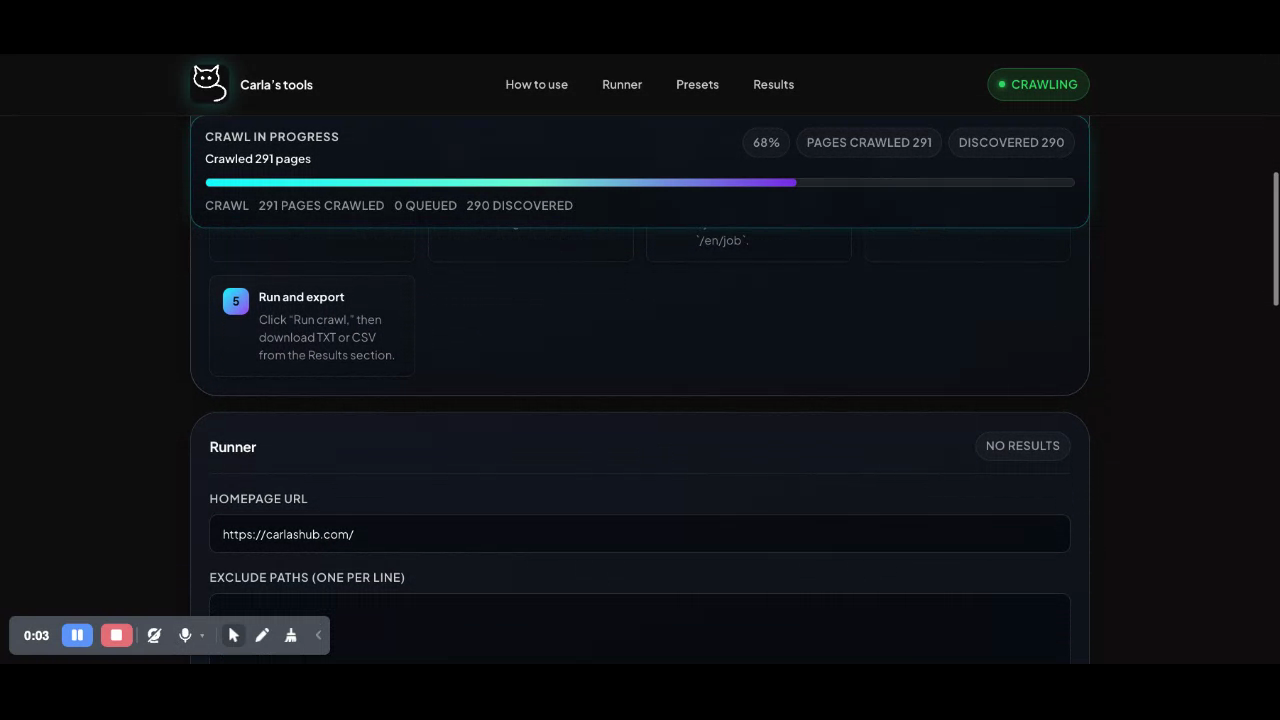
Cat Crawler is a React frontend with a Node backend. The frontend starts a crawl job, polls for progress, and turns the result into grouped reports. The backend does the crawling, stays on one host, respects robots.txt, starts from sitemap discovery when possible, and applies rules like exclude paths, path limits, query handling, broken-link checks, redirect review, parameter audit, soft-failure review, and URL pattern grouping.
What I find most interesting about it is that it is not trying to answer only one question.
It is not just asking whether there are broken links. It is also asking where redirects get messy, where query parameters are dropped, which pages return 200 but still look broken, where URL structures start repeating badly, and which issues probably matter more because they keep showing up in important parts of the site.
That matters much more on big sites than on small ones.
On a large site, especially one with lots of listing pages, search pages, job pages, filters, language paths, and old redirects, a normal click-through is not enough. You need some way to crawl quickly, exclude noisy sections, cap sections that explode, and still get something readable at the end.
That is a big part of why this project has exclude paths, path-based crawl caps, optional job-page suppression, presets, and the bookmarklet launcher. It was designed to work on large sites where one section can flood the whole result set if you do not control it properly.
What is interesting about it
The part I still like most is that it stays practical.
It does not pretend to be a giant all-purpose platform. It takes a site URL, runs a crawl, and gives you grouped results you can actually work through.
A few things stand out to me:
- It was built for large and noisy sites, not only small clean demos.
- It does more than link checking by looking at redirects, parameters, soft failures, patterns, and repeated issues.
- The bookmarklet is useful because it lets you start from the page you are already on instead of switching context.
- The grouped report sections make review easier for people who actually have to act on the results.
- It is fairly honest about limits. It only crawls one host per run, and some of the checks are review aids, not final truth.
What I learned building it
I learned pretty quickly that a quick checker stops being quick once a site gets big.
The original instinct was speed. Just give me a fast way to spot problems. That works up to a point. Then the site gets bigger, the listing sections get noisier, the redirects get stranger, and the result set becomes useless unless the tool has some idea of scope. That is where exclude paths, path caps, presets, and grouped reporting stopped being nice extras and became basic survival.
I also learned that a 200 page can still be broken. A page can return success and still be bad because the content did not load, an API failed, or the page is showing error text inside a successful response. That is why the soft-failure work matters. It is not perfect, but it catches things that a simple status check misses.
Another thing I learned is that teams do not need more output. They need better sorting. Once there is enough data, the real question becomes whether anybody can make sense of it quickly without wasting half a day.
I also learned that big sites need deliberate exclusions. You cannot treat every part of a site equally. Some sections should be crawled deeply, some should be capped, and some should be skipped unless you are checking them on purpose.
And finally, I learned that the tool has to fit how people already work. People are usually already on a page when they realise they want to check something. Starting from that real page matters. Saving presets matters too, because teams repeat similar checks over and over.
Five improvements I would make next
- Crawl history and compare mode. This would make release checks much stronger because teams could compare one crawl against another instead of reviewing everything from scratch.
- Better deduping and clearer issue ranking. Large sites repeat the same problem many times, so the tool should collapse repeated issues more cleanly and make it easier to see what matters first.
- Better section summaries for listing-heavy sites. I would want grouped summaries for sections like
/jobs,/blog, or/locationsso people can review those areas as sections instead of reading everything page by page. - Shareable report views for teams. Exports help, but proper shareable views would make handoff easier for QA, developers, SEO people, content teams, and project managers.
- Stronger page context for failures. A URL on its own is often not enough. I would want better page context around issues so review is faster and clearer.
How this serves teams
I think the clearest value of Cat Crawler is that it helps different people look at the same site from slightly different angles without needing a different tool for each one.
For QA teams, it helps with launch checks, regression passes, redirect review, and broken-path review. For developers, it helps surface route problems, dropped parameters, repeated bad patterns, and sections that need cleaner rules. For SEO or content teams, it helps show duplicate-looking paths, legacy and current path mismatches, redirect problems, and weak areas of site structure. For project teams, the presets and grouped reports help turn repeat checks into something less manual.
That is probably the main thing I would say about the project now. It started as a quick checker, but it became more useful once it stopped trying to crawl everything blindly and started helping people work through large, messy sites in a more controlled way.
What I still like about it
I still like that it is direct.
Open the app. Start a crawl. Control the noisy sections. Review the grouped output. Export if needed. Use the bookmarklet if you are already on the page you want to start from.
That is a good shape for this kind of tool. It is not trying to do everything. It is trying to be useful where big public sites usually get messy.