
People keep talking about MCP servers, but most explanations are too abstract.
So here is the plain version.
MCP stands for Model Context Protocol.
It was introduced by Anthropic on 25 November 2024 as an open standard for connecting AI assistants to the places where useful information and tools live.
The reason it appeared is simple.
AI assistants were becoming more powerful, but they had a problem.
They were often trapped inside the chat box.
They could answer questions, write code, explain things, and reason.
But they could not automatically access your real tools.
They could not naturally see your Figma file.
They could not naturally inspect your GitHub issues.
They could not naturally read your company documentation.
They could not naturally check your browser, database, support tickets, calendar, design system, or local files.
Every tool needed its own custom connection.
That meant one integration for Figma.
Another integration for GitHub.
Another integration for Slack.
Another integration for Jira.
Another integration for Google Drive.
Another integration for a database.
That becomes messy very quickly.
MCP was created to solve that problem.
Instead of every AI tool needing a custom integration for every external system, MCP gives them a shared way to connect.
The simplest explanation is this:
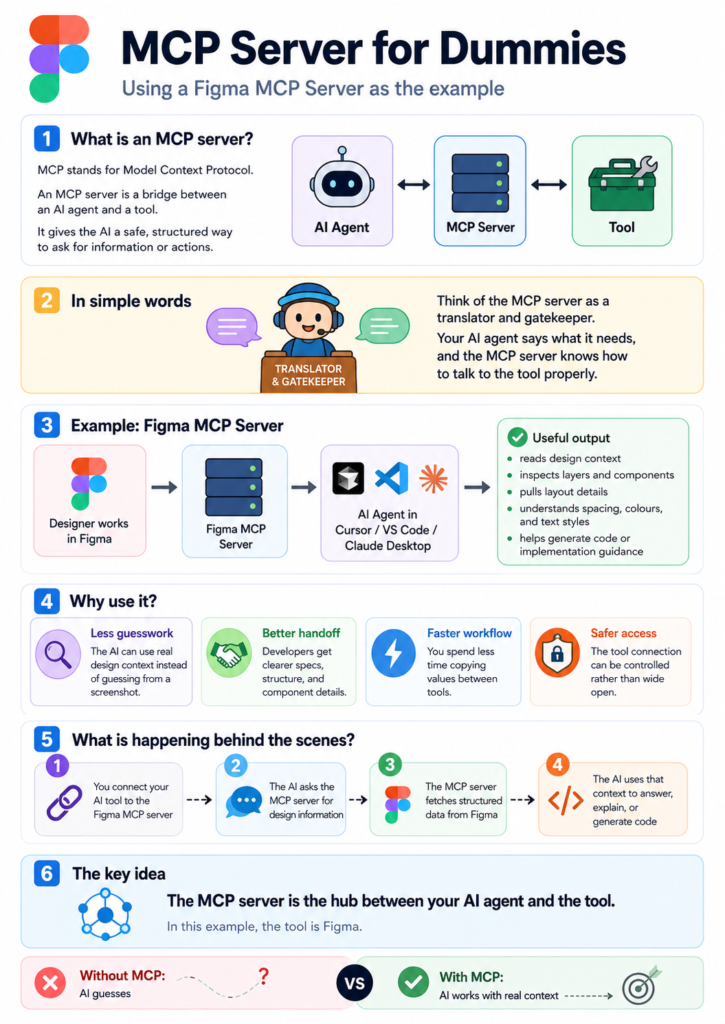
MCP is a standard bridge between an AI agent and a tool.
The AI agent is the brain.
The MCP server is the bridge.
The external tool is where the useful information or action lives.
So the basic structure is:
AI agent → MCP server → external tool
A useful comparison is FileZilla.
FileZilla lets a human connect to a remote server.
You open FileZilla.
You connect to the server.
You browse files.
You download files.
You upload files.
You manage things through a controlled connection.
So with FileZilla, the model is:
Human → FileZilla → remote server
MCP is not the same as FileZilla, but the mental model helps.
With MCP, the model is:
AI agent → MCP server → external tool
FileZilla helps a person access files on a server.
MCP helps an AI agent access tools and context.
That is the core idea.
Now let’s make it practical.
Example 1: Figma
Imagine a designer creates a page in Figma.
You ask an AI agent:
“Can you help me build this design?”
Without MCP, the AI might only have a screenshot.
It may guess the spacing.
It may guess the colours.
It may guess the typography.
It may guess the structure.
With a Figma MCP server, the AI can access structured design context from Figma.
It can understand layers, components, text styles, colours, spacing, layout, and design tokens.
So the flow becomes:
AI agent → Figma MCP server → Figma
The AI is no longer only guessing from a picture.
It can work with real design information.
A practical use case:
A developer asks the AI:
“Look at this Figma frame and create the HTML and CSS structure for it.”
The AI can inspect the design context and suggest a more accurate implementation.
Example 2: GitHub
Imagine you are working on a repository.
You ask your AI agent:
“What open issues relate to the navigation bug?”
Without MCP, the AI only knows what you paste into the chat.
With a GitHub MCP server, the AI can connect to GitHub and inspect issues, pull requests, branches, files, and repository context.
The flow becomes:
AI agent → GitHub MCP server → GitHub
A practical use case:
You ask:
“Find the issue about the broken mobile menu, check the related pull request, and summarise what still needs fixing.”
The AI can use GitHub context instead of relying on your memory.
Example 3: Browser DevTools
Imagine you are debugging a website.
You ask your AI agent:
“Why is this button not clickable?”
Without MCP, you have to describe the issue manually.
With a DevTools MCP server, the AI may be able to inspect the browser page, look at the DOM, check console errors, inspect network requests, and understand what is happening in the live page.
The flow becomes:
AI agent → DevTools MCP server → browser DevTools
A practical use case:
You ask:
“Check why this menu opens visually but is not usable with keyboard focus.”
The AI can inspect the actual page state, not just guess from your explanation.
Example 4: Documentation
Imagine you are using a framework or API.
You ask:
“What is the correct way to configure this?”
Without MCP, the AI may answer from general knowledge, which may be outdated.
With a documentation MCP server, the AI can search the official docs directly.
The flow becomes:
AI agent → docs MCP server → official documentation
A practical use case:
You ask:
“Check the current documentation and tell me the correct setup.”
The AI can base the answer on the latest documentation instead of giving stale advice.
Example 5: Database
Imagine a business has customer orders in a database.
A manager asks:
“How many orders failed this week?”
Without MCP, someone has to manually query the database or export a report.
With a database MCP server, the AI can ask the database for the relevant information, if permissions allow it.
The flow becomes:
AI agent → database MCP server → database
A practical use case:
You ask:
“Show me failed payments from the last seven days, grouped by error type.”
The AI can retrieve the data and summarise it.
This must be handled carefully because databases can contain private information.
Example 6: Jira
Imagine a team tracks work in Jira.
You ask:
“What is blocking the release?”
Without MCP, someone has to search tickets manually.
With a Jira MCP server, the AI can inspect tickets, statuses, blockers, comments, and assignees.
The flow becomes:
AI agent → Jira MCP server → Jira
A practical use case:
You ask:
“Find all high-priority accessibility bugs still open for this release and summarise what needs action.”
The AI can read the current ticket state and return a useful summary.
Example 7: Google Drive or company documents
Imagine your company has policies, project notes, spreadsheets, and planning documents.
You ask:
“What did we decide in the last project plan?”
Without MCP, the AI cannot know unless you paste the document.
With a document MCP server, the AI can search the relevant files, read the allowed documents, and summarise them.
The flow becomes:
AI agent → document MCP server → company documents
A practical use case:
You ask:
“Find the latest project brief and summarise the requirements.”
The AI can work from the actual document instead of relying on memory.
Example 8: Local files
Imagine you have a project on your machine.
You ask:
“Where is the function that controls the mobile navigation?”
Without MCP, you may have to paste files into the chat.
With a local file or codebase MCP server, the AI can search the project structure.
The flow becomes:
AI agent → filesystem MCP server → local project files
A practical use case:
You ask:
“Find the mobile menu script, explain how it works, and suggest where to add the Escape key behaviour.”
The AI can inspect the actual codebase.
So the pattern is always the same:
AI agent → MCP server → tool
The tool can be Figma, GitHub, DevTools, Jira, documentation, a database, Google Drive, Slack, a codebase, or another system.
The MCP server is not the AI.
The MCP server is not the tool.
The MCP server is the controlled connection between them.
This is why MCP matters.
Without MCP, the AI often depends on what you paste into the chat.
With MCP, the AI can access the right tool directly, within the permissions you give it.
That means better answers.
Less guessing.
Less copy and paste.
More useful agents.
But there is an important warning.
MCP gives AI agents access to tools.
That is powerful, but it is also risky.
You must think about permissions.
Can the AI only read?
Can it edit?
Can it delete?
Can it send messages?
Can it access private data?
Can it run commands?
Can it touch production systems?
A safe MCP setup should limit what the AI can do.
For example:
- Allow the AI to read documentation.
- Be careful before allowing it to edit files.
- Be very careful before allowing it to delete data.
- Be extremely careful before allowing it to run commands or access production systems.
The point is not to give AI unlimited power.
The point is to give AI controlled access to useful context.
So the shortest explanation is:
An MCP server is a safe bridge between an AI agent and a tool.
Or even simpler:
FileZilla helps humans connect to server files.
MCP helps AI agents connect to tools and context.
In practical terms:
- Figma MCP helps AI understand designs.
- GitHub MCP helps AI understand repositories, issues, and pull requests.
- DevTools MCP helps AI inspect and debug web pages.
- Docs MCP helps AI read official documentation.
- Database MCP helps AI query business data.
- Jira MCP helps AI understand tickets and blockers.
- Drive MCP helps AI search documents.
- Filesystem MCP helps AI inspect local project files.
That is MCP.
Not magic.
Not hype.
Just a standard way to connect AI agents to the tools they need, without building a different custom integration every single time.