
I do not think agentic development is about replacing developers with a chatbot.
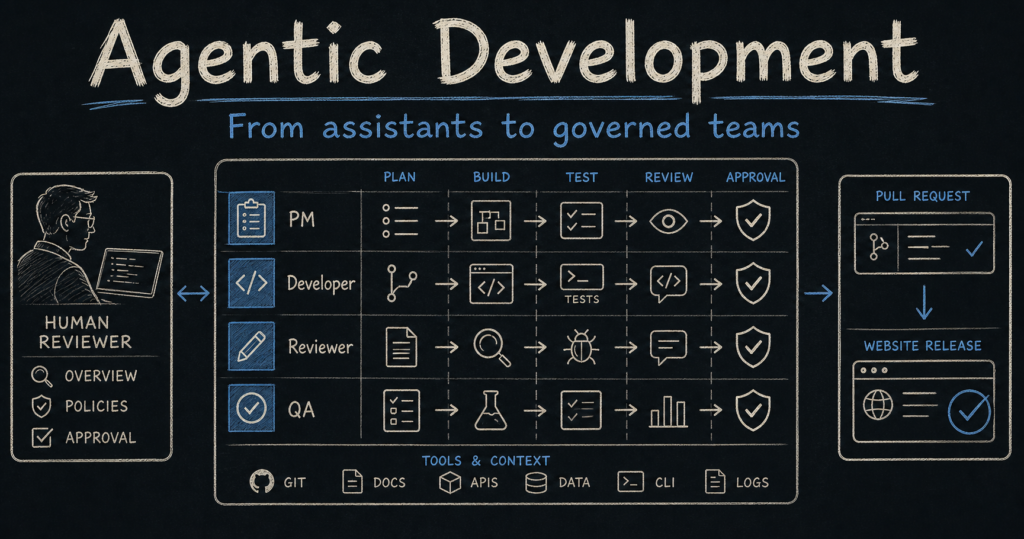
I think it is about something more practical: turning AI from a single helper into a controlled delivery system.
That means roles, tools, state, evidence, reviews, approvals, logs, and clear stopping points.
This matters because one AI assistant can help you move faster. A team of AI agents can help you move work through a process. But only if the process is designed properly.
The short version
Traditional AI coding help works like this:
Human asks → AI answers → human decides what to do next
Agentic development works more like this:
Goal → PM agent plans → worker agents act → reviewer agents check → evidence is recorded → human approves → release moves forward
The difference is not just speed. The difference is structure.
Chatbot → Answer
Goal → Plan → Build → Review → Approve → Release
The mental model: agents are not magic, they are workers with contracts
A useful AI agent needs a contract.
By contract, I mean a clear agreement about what the agent can do, what it cannot do, what evidence it must produce, and when it must stop.
A good analogy is a construction site.
You would not let the electrician approve the whole building. You would not let a junior worker change the structural plan. You would not call the building complete because someone created a pile of materials.
Software agents need the same discipline.
| Construction site | Agentic development |
|---|---|
| Architect | System designer or PM agent |
| Builder | Developer agent |
| Inspector | Reviewer or QA agent |
| Permit | Human approval gate |
| Blueprint | Plan, task file, architecture note |
| Inspection report | Evidence, tests, logs, review notes |
Why companies are moving this way
Companies are not moving toward agents only because agents are fashionable.
They are moving this way because normal AI assistants have limits.
- A chatbot waits for the next prompt. A workflow agent can keep a task moving.
- A chatbot answers from context. A tool-using agent can inspect files, tickets, docs, logs, or test results.
- A chatbot can forget the process. A stateful workflow can remember what phase the work is in.
- A chatbot can sound confident. A governed agent must produce evidence.
- A chatbot can help one person. A multi-agent system can support a team process.
This is why agentic development is likely to become normal in serious engineering teams. The future is not just “AI writes code”. The future is AI participating in the software delivery lifecycle: planning, implementation, review, testing, documentation, pull request preparation, release notes, and monitoring.
The core process
This is the process I would use for a real website, app, plugin, or internal tool.
1. Define the outcome.
2. Split the work into small tasks.
3. Assign each task to the right agent role.
4. Give each agent a narrow tool set.
5. Require evidence from every task.
6. Review the evidence separately.
7. Ask for human approval at risk points.
8. Only then move to the next step.
Goal → Task → Worker → Evidence → Review → Approval
If review fails, the task loops back for repair. It does not move forward just because the agent says done.
The roles in an AI agent team
| Role | What it does | What it must not do |
|---|---|---|
| PM agent | Turns goals into tasks, tracks status, records risks, asks for approval. | Approve missing evidence. |
| Developer agent | Reads the task, edits scoped files, runs checks, writes a handoff. | Change unrelated files or deploy alone. |
| Reviewer agent | Checks correctness, scope, maintainability, security, and assumptions. | Rubber-stamp the developer agent. |
| QA agent | Runs functional, responsive, regression, and browser checks. | Ignore failed or untested paths. |
| Accessibility agent | Checks keyboard, names, headings, forms, contrast, focus, and WCAG risks. | Claim accessibility without evidence. |
| Release agent | Prepares release notes, changelog, package, and deployment checklist. | Release without approval. |
The framework landscape
Different frameworks exist because agentic systems have different problems.
Some tools are good at specialist handoffs. Some are good at state machines. Some are good at role-based teams. Some are built for enterprise governance. Some are better for coding workflows inside a repository.
| Framework or approach | Why it exists | Difficulty | Best use |
|---|---|---|---|
| Manual agent chats | To learn the process before automation. | Easy | Small experiments and learning. |
| File-based project control | To make work visible and auditable. | Easy to medium | Codex, local repos, solo builders. |
| Codex / coding-agent workflow | To let agents work directly in a codebase. | Medium | Implementation, refactoring, tests, PR prep. |
| OpenAI Agents SDK | To build custom agents with tools, guardrails, sessions, tracing, and handoffs. | Medium | Custom agent apps and specialist routing. |
| LangGraph | To build stateful graph workflows with loops, memory, durable execution, and human approval. | Medium to hard | Strict workflows and long-running processes. |
| CrewAI | To model role-based crews, tasks, and event-driven flows. | Medium | Team-like multi-agent workflows. |
| Microsoft Agent Framework | To bring AutoGen and Semantic Kernel patterns into a more enterprise-shaped agent framework. | Hard | Microsoft, Azure, enterprise governance. |
| AutoGen | To explore multi-agent conversations and tool-using agent collaboration. | Medium to hard | Learning, research, existing AutoGen systems. |
1. Manual agent chats
This is the beginner version. You open separate chats and give each chat a role.
The value is not speed. The value is learning the workflow.
Carla → PM → Developer → Reviewer → QA → Carla
Good for learning. Bad for scale because the human becomes the router.
2. File-based project control
This is the first serious step. Instead of trusting a chat transcript, you create files that store the project state.
project-control/
  PROJECT-STATUS.md
  TASK-BOARD.md
  RISK-LOG.md
  DECISION-LOG.md
  APPROVAL-LOG.md
  EVIDENCE-REGISTER.md
  tasks/
  handoffs/
  reviews/
  test-results/
Analogy: this is the project’s black box recorder. If something goes wrong, you can inspect what happened.
3. Codex and coding-agent workflows
A coding agent workflow is different from a normal chatbot because it can inspect the repository, edit files, run commands, and report changed files.
This is where agentic development starts to feel real.
PM agent creates task.
Developer agent edits scoped files.
Developer agent runs tests.
Reviewer agent checks diff.
QA agent verifies behavior.
Human approves pull request.
Real example: a developer asks for a mobile navigation fix. The PM agent creates a task. The developer agent changes only the navigation module. The reviewer agent checks keyboard behavior, focus return, and unrelated file changes. The QA agent tests desktop and mobile. The human reviews the pull request.
4. OpenAI Agents SDK
OpenAI Agents SDK is useful when you want to build a custom agent application instead of using only a chat UI.
The important concepts are agents, tools, guardrails, sessions, tracing, and handoffs.
A handoff means one agent can transfer the task to a more specialised agent.
Triage agent → Developer agent
Triage agent → Reviewer agent
Tools + Guardrails + Tracing
Real example: build an internal support agent. A triage agent reads the request. If it is a billing question, it hands off to a billing agent. If it is a technical bug, it hands off to a technical agent. Guardrails stop the agent from exposing private data or taking unsafe actions.
5. LangGraph
LangGraph exists because real agent workflows are rarely straight lines.
They branch, pause, retry, wait for humans, remember state, and continue later.
That is why LangGraph is useful for stateful graph workflows.
Draft → Review pending → Human approval → Next phase
Fail → Remediation → Review pending
Real example: a compliance workflow. The agent drafts a report, a reviewer checks it, a human approves it, and if the review fails, the workflow loops back for remediation instead of moving forward.
6. CrewAI
CrewAI uses the idea of crews and flows.
A crew is a group of agents with roles. A flow controls the sequence and state of the work.
This is easy to understand because it maps to how teams already work.
Crew: PM Researcher Developer QA
Flow: Plan → Research → Build → Test → Report
Real example: content production. One agent researches sources, one drafts, one checks facts, one prepares SEO metadata, and one creates the publishing checklist. The risk is that without evidence gates, the crew can produce a polished but weak article.
7. Microsoft Agent Framework
Microsoft Agent Framework is aimed at more enterprise-shaped agent development. It brings together ideas from Microsoft’s AutoGen and Semantic Kernel direction.
This is not where I would start for a solo website project. It makes more sense when a company needs typed workflows, enterprise integrations, observability, governance, and Microsoft ecosystem alignment.
Enterprise app → Agent workflow → Middleware → Telemetry → Azure / Microsoft tools
Real example: a large company wants an internal agent that can read approved documentation, search tickets, call approved APIs, create draft work items, and log every tool call for audit.
8. AutoGen
AutoGen helped popularise multi-agent conversations: agents talking to each other, using tools, and involving a human when needed.
It is still useful to understand the history and existing systems. For new Microsoft-oriented work, Microsoft is moving toward Agent Framework.
Agent A ↔ Agent B ↔ Agent C
Human can interrupt Tools can be used
How to choose
| If you need… | Start with… | Why |
|---|---|---|
| To learn the concept | Manual chats | You see every handoff clearly. |
| A serious solo project | File-based control + Codex | You get evidence and repo changes without heavy framework setup. |
| A custom agent app | OpenAI Agents SDK | Good for agents, tools, guardrails, handoffs, tracing. |
| A strict state machine | LangGraph | Good for loops, human approval, durable workflows. |
| A role-based agent team | CrewAI | Good mental model for crews, tasks, and flows. |
| Enterprise Microsoft integration | Microsoft Agent Framework | Better fit for Azure, enterprise patterns, governance. |
| Research or older multi-agent systems | AutoGen | Useful for understanding multi-agent conversation patterns. |
The safety rule: no agent should have more power than the process can verify
This is the rule I would use in any real project.
No agent should have more freedom than the team can test, monitor, explain, and roll back.
If the agent can only draft text, the risk is low. If it can edit code, the risk is higher. If it can query private data, open pull requests, change production systems, or send messages externally, the risk is much higher.
Low risk:
Read public docs and summarise.

Medium risk:
Read project files and suggest changes.

High risk:
Edit files, create pull requests, call internal APIs.

Critical risk:
Touch production, customer data, payments, security systems, or deployment pipelines.
A practical starter architecture
If I were starting a real project today, I would begin with this simple architecture.
agent-system/
  project-control/
    PROJECT-STATUS.md
    TASK-BOARD.md
    RISK-LOG.md
    APPROVAL-LOG.md
    EVIDENCE-REGISTER.md
  tasks/
    DEV-001-fix-navigation.md
    QA-001-test-navigation.md
  handoffs/
    DEV-001-handoff.md
  reviews/
    REVIEW-001-navigation.md
  scripts/
    run-checks.sh
Then I would use this prompt shape for every agent task:
Role:
You are the Developer Agent.

Task:
Fix the mobile navigation keyboard behavior.

Scope:
Only edit the navigation component and related tests.

Do not touch:
Homepage layout, footer, unrelated CSS, production settings.

Evidence required:
- files changed
- tests run
- browser checks
- known issues
- handoff note

Stop condition:
Stop after the handoff. Do not approve your own work.
Why agentic development is the future
Agentic development is the future because software work is not only writing code.
Real software work includes reading requirements, checking constraints, searching documentation, changing files, running tests, reviewing evidence, writing summaries, creating pull requests, checking accessibility, checking security, and explaining what changed.
Those are process tasks. Agents are useful when they can move through process tasks with tools and evidence.
The future is not “one AI does everything”. That is too vague and too risky.
The future is smaller specialised agents working inside governed systems.
Final checklist
- Define the goal before choosing a framework.
- Split the workflow into agent roles.
- Give each agent a limited tool set.
- Require evidence for every task.
- Separate maker and reviewer.
- Use human approval for risky steps.
- Record decisions, risks, and failures.
- Choose a framework only after the process is clear.