
I built this because I kept running into the same problem with AI agents. They can move fast, but speed is not the same as control. The more I used agents for real work, the more obvious it became that the important part is not just what they can generate. It is how they are allowed to work.
That is where governance comes in.
I do not mean governance as a huge policy document that nobody reads. I mean simple project rules that sit close to the work. What is the agent allowed to do? What is it not allowed to do? What data can it touch? What tools can it use? Who approves the work? What evidence does it need to leave behind?
Without that, an agent can look productive while still being risky. It can generate files, make confident claims, skip checks, use the wrong tool, or assume approval that was never given. That is fine for experiments. It is not fine when the agent is part of a delivery workflow.
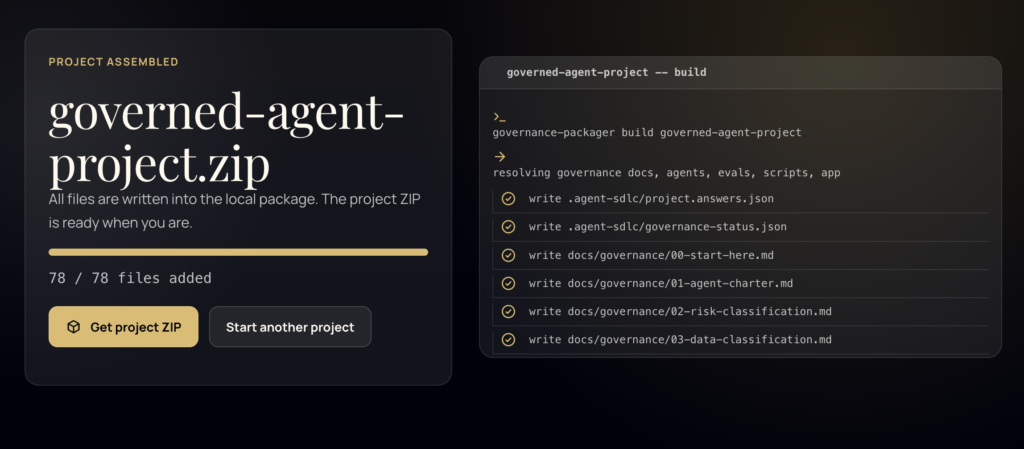
So I built the AI-Agent SDLC Boilerplate as a quick setup for governed agent projects. The goal is to give teams a starting structure before implementation begins.
Instead of starting with:
Build this.
The project starts with:
What is this agent allowed to do?
That small change matters.
What the boilerplate sets up
The boilerplate helps set up the basic things I want in place before an agent starts touching files or making decisions.
scope
data boundaries
tool access
job roles
approval gates
evidence rules
policy checks
eval cases
release checks
It gives the project a simple governance layer before implementation starts. Not heavy. Just enough structure so the agent is not working from vibes.
The gate
The main check is:
npm run governance:checkIf the required governance files are missing, if placeholders are still in the docs, or if approval has not been recorded, the check fails. That means the agent has to stop before implementation.
That is the point. Agents need stop signs.
Why job roles matter
One of the examples in the repo is a QA Auditor profile. I used this because it shows why job roles matter. A QA auditor agent should not behave like a developer. It should not quietly fix the thing it is reviewing. It should inspect, classify, explain, and leave evidence.
The boilerplate asks useful questions before the agent starts.
What is in scope?
What is out of scope?
What severity model should be used?
What evidence does each finding need?
When should something escalate?
What data is blocked?
What tools are blocked?
Who approves implementation?
Who approves release?
That is much better than asking an agent to “review this” and hoping it understands the boundaries.
A governed QA auditor can define rules like:
Critical findings block release.
High findings block until fixed or accepted.
Medium findings need tracked remediation.
Low findings can ship only with rationale.
It can also require evidence.
reproduction steps
expected result
actual result
affected artefact
screenshot or test output
impact
confidence
recommended owner action
That makes the output easier to review later.
Tool access is part of the work
Another important part is the tool access map. This is where the project writes down what tools the agent can use and why. That matters because not all tools carry the same risk.
A local browser check is not the same as a production database query. Reading git status is not the same as changing repo settings. Demo data is not the same as client data.
The tool access map makes those differences explicit.
What tool can the agent use?
Why can it use it?
Is it read-only or write-enabled?
What data does it touch?
What is the risk?
Does it need approval?
Approval should be visible
The boilerplate also keeps human approval visible. An agent should not treat “the user asked me” as approval to implement or release. Those are different things.
So the approval record tracks:
who approved the work
what was approved
what conditions apply
what is still blocked
This is useful because agent work can become hard to audit if everything only lives in chat. The boilerplate moves the important decisions into files that can be reviewed later.
The eval cases
The repo also includes eval cases for common agent problems.
scope creep
prompt injection
forbidden actions
sensitive data
tool misuse
unsupported claims
missing approval
missing audit logs
These are the situations that break agent workflows in real projects. A document tells the agent to ignore the rules. A user asks it to deploy before approval. A tool is available but not approved. The agent says checks passed when it did not run them.
The eval cases give those risks a place in the project.
The benefit
The benefit of this setup is not that it makes agents slower. It makes them safer to use.
a faster project start
clearer agent boundaries
less guesswork
better review evidence
separate implementation and release approval
repeatable checks
a cleaner audit trail
a structure teams can adapt
That is what I wanted. A quick way to start an agent project without leaving all the important rules inside a prompt.
I do not think every project needs a heavy process. But if an agent can use tools, touch files, inspect systems, or influence delivery, it needs some kind of governance.
This boilerplate is my starting point for that.
Less “just trust the agent”. More “show me what it was allowed to do, what it actually did, and who approved it”.
Links
Project demo:
https://carlashub.github.io/ai-agent-sdlc-boilerplate/
Demo recording:
https://carlashub.github.io/ai-agent-sdlc-boilerplate/demo-recordings/northstar-support-qa-auditor-demo.webm